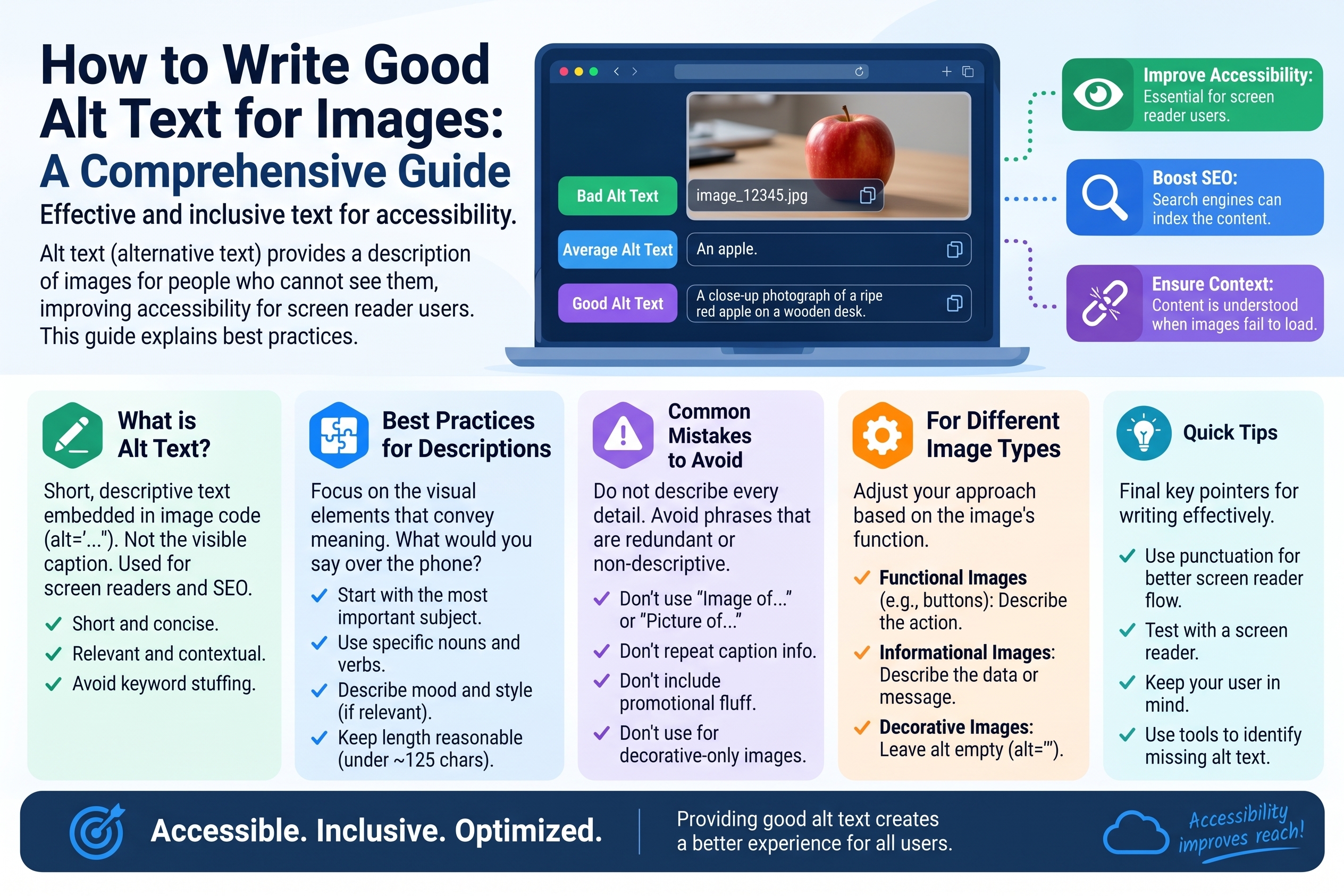
How to Write Good Alt Text for Images
Every image on your website should carry a short text description called alt text — and most websites get it badly wrong. They leave it empty, stuff it with keywords, or write "image of image." Good alt text is one of the rare things that helps real people and search engines at the same time: it makes your site usable for blind visitors while giving Google the context it needs to rank your images. Here's how to write it well.
What Is Alt Text?
Alt text (short for "alternative text") is the alt attribute of an HTML image tag:
<img src="golden-retriever-puppy.jpg" alt="Golden retriever puppy chewing a red ball on green grass">
It serves three jobs:
- Screen readers read it aloud. Blind and low-vision users hear the alt text instead of seeing the image. Without it, they hear only "image" — or worse, a meaningless filename like
IMG_4829.jpg. - It displays when the image fails to load. Slow connections, broken links, blocked images — in all these cases the alt text appears in the image's place.
- Search engines use it to understand images. Google can't "see" your photo of a handmade ceramic mug; the alt text tells it what the image shows, which feeds into both web search and Google Images rankings.
Alt text is invisible to sighted users under normal conditions — which is exactly why it's so often neglected. The people who need it most can't tell you it's missing.
Why It Matters: Accessibility and SEO
Accessibility: it's the law in many places, and it's the right thing everywhere
Roughly 300 million people worldwide live with significant vision impairment. For screen-reader users, alt text is the only way image content reaches them. A news article whose photos have no alt text is an article with holes in it.
Beyond ethics, there are legal teeth: accessibility laws like the ADA (US), the European Accessibility Act, and equivalents elsewhere increasingly treat missing alt text as a compliance failure. Lawsuits over inaccessible websites are filed by the thousands every year.
SEO: context Google can actually use
Google Images drives meaningful traffic for many sites — e-commerce, recipes, travel, portfolios. Descriptive alt text with natural, relevant keywords helps your images rank there, and it reinforces the page's topical relevance for regular search too. It's a small ranking factor for the page, but a large one for image search.
The Anatomy of Good Alt Text
Good alt text answers one question: what would you tell someone on the phone about this image? Follow these principles:
- Be specific and concise. Describe the subject and the important details, usually in one sentence of about 125 characters or fewer (some screen readers cut off longer text).
- Include relevant context. Why is this image here? A photo in a recipe post should mention the dish; the same photo in a photography tutorial should mention the lighting.
- Skip "image of" / "picture of." Screen readers already announce "image," so "image of a dog" is heard as "image, image of a dog." Start directly: "Golden retriever puppy..."
- Use keywords naturally, once. If the keyword genuinely describes the image, include it. If you're forcing it in, don't.
- End with a period for cleaner screen-reader pausing (a minor nicety, but free).
- Match the image's function. A linked image's alt text should describe the link destination ("Search the catalog"), not the magnifying-glass icon.
Good vs. Bad: Before-and-After Rewrites
Seeing the difference makes the rules click. Each pair below shows a bad version and a rewritten good one:
Example 1 — Product photo
- ❌ Bad:
alt="shoes" - ✅ Good:
alt="Red Nike Air Zoom running shoes, side view on white background"
Example 2 — Blog hero image
- ❌ Bad:
alt="image123_final2.jpg" - ✅ Good:
alt="Hiker standing on a mountain ridge at sunrise above a sea of clouds"
Example 3 — Team photo
- ❌ Bad:
alt="our amazing team team building teamwork office team" - ✅ Good:
alt="Six members of the design team smiling around a conference table"
Example 4 — Chart
- ❌ Bad:
alt="chart"(or empty) - ✅ Good:
alt="Bar chart showing website traffic doubling from 10k to 20k monthly visitors between January and June"
Example 5 — Decorative divider
- ❌ Bad:
alt="pretty blue line decoration" - ✅ Good:
alt=""(empty — it's decorative; more on this below)
Notice the pattern: the good versions describe what's actually visible and relevant, in plain language, without keyword repetition or throat-clearing.
Special Cases
Decorative images: leave alt empty
Not every image needs description. Purely decorative images — dividers, background textures, spacer graphics — should have empty alt text (alt=""). This tells screen readers to skip them entirely. A screen reader announcing "decorative blue flourish" twelve times per page is a bad experience. Note: empty alt (alt="") is not the same as missing alt — the empty attribute is a deliberate "skip this" signal; a missing attribute makes some screen readers read the filename.
Complex images: charts, graphs, infographics
A single sentence can't capture a detailed chart. Options:
- Write a concise alt summary ("Line graph showing steady revenue growth from 2020 to 2025") and put the full data in the surrounding text or a linked long description.
- For infographics, reproduce the key points as text below the image — good for accessibility and SEO, since search engines can index it.
Functional images: buttons and icons
For images that act as controls, describe the action, not the appearance: a magnifying-glass search button gets alt="Search", not alt="Magnifying glass icon". A logo linking to the homepage gets alt="Acme Corp home".
Length and Keyword Tips
- Aim for under 125 characters. It's a widely cited practical limit based on screen-reader behavior. Most good alt text lands between 40 and 100 characters.
- One keyword, naturally. If your page targets "handmade ceramic mug," then
alt="Handmade ceramic mug with blue glaze"is perfect. Repeating "handmade ceramic mug" three times is keyword stuffing and helps nobody. - Don't duplicate the caption. If the visible caption already says "Sunset over Santorini," the alt text can be shorter or complementary — screen readers encounter both.
- Front-load the important words. Put the subject first ("Golden retriever puppy..."), details after. Some contexts truncate.
Common Mistakes to Avoid
- Leaving alt text empty on meaningful images. The most common mistake of all. Every content image needs a description.
- Keyword stuffing.
alt="cheap shoes buy shoes online best shoes discount shoes"reads terribly to screen-reader users and can hurt rather than help SEO. - "Image of..." redundancy. Screen readers say "image" already. Cut it.
- Describing every pixel. Alt text is a summary, not a police sketch. Mention what matters for understanding the content.
- Using the filename as alt text.
IMG_20240115_083412.jpgtells nobody anything. - Same alt text on every image. If all ten product photos say "red dress," they're indistinguishable to screen-reader users. Differentiate: front view, back view, detail of fabric.
- Forgetting alt text in CMS uploads. Most CMSs (WordPress, Shopify, etc.) have an alt-text field in the media uploader. Fill it in at upload time — retrofitting hundreds of images later is miserable.
A Quick Alt-Text Workflow
- At upload time, look at the image and ask: "What is this, and why is it on the page?"
- Write one specific sentence, under ~125 characters, no "image of."
- Check keyword fit: does your target phrase describe the image naturally? Include it once if yes.
- Decorative? Set
alt=""deliberately. - Complex? Add a text summary or data table near the image.
Five steps, thirty seconds per image — and your site becomes usable for millions more people while earning better image-search visibility.
Frequently Asked Questions
Q: Does alt text really affect SEO? A: Yes — primarily for image search, where it's one of the strongest signals Google has about what an image shows. For regular web search it's a smaller relevance signal, but a real one. Either way, write for humans first; the SEO benefit follows.
Q: How long should alt text be? A: Aim for under 125 characters — roughly one concise sentence. Screen readers may truncate longer text, and brevity forces you to focus on what actually matters in the image.
Q: Should I include keywords in alt text? A: Include them only when they genuinely describe the image, and only once. Natural, accurate description is the goal; keyword stuffing degrades the screen-reader experience and can backfire with search engines.
Q: What's the difference between empty alt text and missing alt text? A: alt="" (empty) tells screen readers to skip the image — correct for decorative graphics. A missing alt attribute gives no instruction, so screen readers may announce the filename instead. Always include the attribute; leave it empty only on purpose.
Q: Do background images need alt text? A: CSS background images can't have alt text. If a background image conveys meaningful content, that's a sign it should be a real <img> with alt text instead. Truly decorative backgrounds need nothing.
Related Articles
- Image SEO: How to Optimize Images for Search
- JPG vs PNG vs SVG vs WebP: Image Formats Compared
- URL Slugs: Best Practices for SEO and Readability