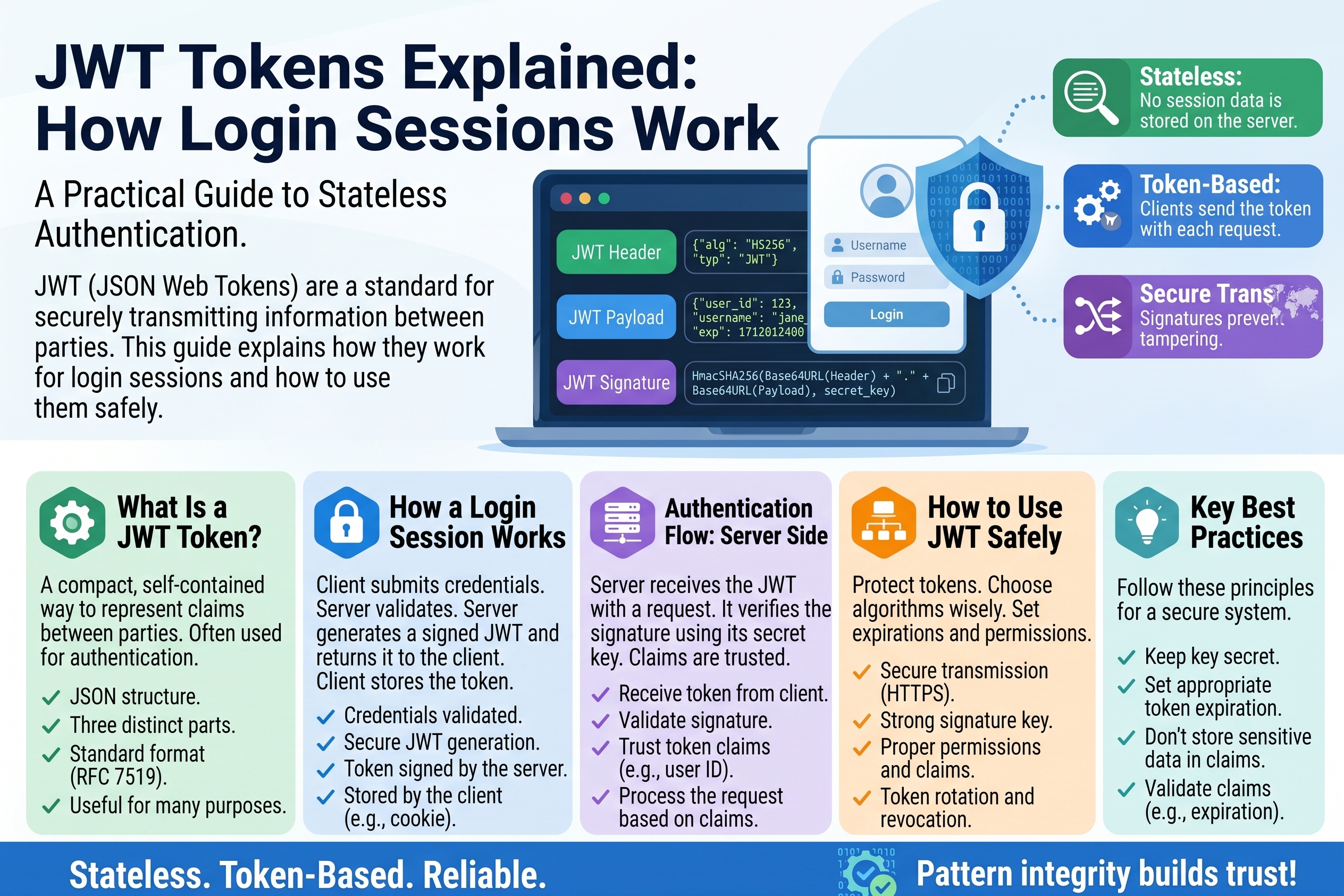
JWT Tokens Explained: How Login Sessions Work
That is a JWT (pronounced "jot") — a JSON Web Token. It is how modern apps handle login sessions, and understanding its three parts will change how you think about web security. In this guide, you will learn what each part does, exactly how a login flow uses the token, and the one critical rule about what must never go inside it.
What a JWT Is
A JWT is a compact, self-contained way to prove "I am logged in as this user." Instead of the server remembering every active session in a database (the old way), the server hands you a signed token containing your identity. You send it back with every request, the server verifies the signature, and trusts the contents — no database lookup needed.
That self-containment is the whole point. It is why JWTs power:
- Login sessions in web and mobile apps ("stay logged in")
- API authentication — your app proves who it is on every call
- Single sign-on — log in once, access many services
- Password-reset and email-verification links — the token in the URL is a short-lived JWT
A JWT always has exactly three parts, separated by dots: header.payload.signature. Let us open each one.
Part 1: The Header
The header is a small JSON object describing how the token is built — which signing algorithm was used, and that this is indeed a JWT:
{
  "alg": "HS256",
  "typ": "JWT"
}
algis the signature algorithm —HS256(HMAC with SHA-256, using a shared secret) is the most common;RS256(RSA, using a public/private key pair) is common for single sign-on.typsimply labels the token type as JWT.
This JSON is then Base64URL-encoded (a URL-safe variant of Base64) to become the first chunk of the token: eyJhbGciOiJIUzI1NiIsInR5cCI6IkpXVCJ9. Nothing secret here — it is just metadata.
Part 2: The Payload (Claims)
The payload carries the actual information — the claims about the user. Here is the decoded payload of our example token:
{
  "sub": "1234567890",
  "name": "Ayesha Khan",
  "iat": 1516239022
}
Standard claims you will see everywhere:
sub    subject — who the token is about (usually the user ID)
name   the user's display name
iat    "issued at" — when the token was created (Unix timestamp)
exp    "expires at" — when the token stops being valid (Unix timestamp)
nbf    "not before" — token is not valid before this time
iss    "issuer" — which service created the token
aud    "audience" — which service the token is intended for
Applications also add custom claims — role: "admin", plan: "premium", anything the app needs to know about the user on every request without hitting the database.
Like the header, the payload is only Base64URL-encoded — and this is the critical fact of the entire article, so let us say it plainly: encoding is not encryption. Anyone who has the token can decode the payload in seconds (paste it into any JWT debugger and watch). Keep this in mind — we will return to it.
Part 3: The Signature
The signature is what makes the token trustworthy. It is created by taking the encoded header, the encoded payload, and a secret key that only the server knows, and running them through the signing algorithm:
signature = HMACSHA256(
    base64UrlEncode(header) + "." + base64UrlEncode(payload),
    secret_key
)
When the server receives the token back, it repeats this calculation with its secret. If the result matches the signature on the token, the contents are genuine — nobody altered them, because nobody else knows the secret. If even one character of the header or payload was changed, the signature will not match, and the server rejects the token.
This is the elegant trick: the server does not need to remember the token at all. The signature is the memory — mathematics replaces the session database.
How Login Sessions Use JWTs: The Full Flow
Here is the complete journey, step by step:
Step 1 — You log in. You submit your email and password. The server checks them against its user database.
Step 2 — The server mints a token. Credentials valid? The server builds a payload (sub: your user ID, iat: now, exp: now + 1 hour, maybe role: "customer"), signs it with its secret, and sends the finished JWT back to your browser — typically stored in memory or an HTTP-only cookie.
Step 3 — You browse. Every request your browser makes (load profile page, fetch orders, post a comment) includes the token, usually in the Authorization header:
Authorization: Bearer eyJhbGciOiJIUzI1NiIs...
Step 4 — The server verifies. For each request, the server recomputes the signature. Match? It trusts the sub claim and treats you as that user — no session database consulted. No match or expired exp? You get a 401 and are sent back to login.
Step 5 — Refresh. Because tokens expire (often after minutes or hours, for safety), apps use a second, longer-lived refresh token to quietly request a fresh JWT without making you log in again. The short-lived access token limits the damage if one is ever stolen.
Notice what the server never does in this flow: look up "is this session still active?" in a database. That is the scalability win — a thousand servers can each verify tokens independently, sharing nothing but the secret key.
The Critical Rule: Never Put Secrets in the Payload
This is the mistake that turns a working login system into a data leak. Because the payload is only Base64URL-encoded — not encrypted — its contents are readable by anyone who sees the token. And tokens get seen: they sit in browser storage, travel in headers, and appear in logs.
Try it yourself right now: take any JWT, paste it into an online JWT debugger, and the payload appears as plain JSON. That is by design.
So the rule is absolute:
SAFE in payload:    user ID, username, role, permissions,
                    issue/expiry times, issuer name
NEVER in payload:   passwords, password hashes, API keys,
                    credit card numbers, personal ID numbers,
                    internal secrets, anything private
A real-world failure mode: a developer stores isAdmin: true in the payload and checks it client-side to show the admin panel. An attacker decodes their own token, flips nothing (they cannot forge the signature) — but they learn the exact claim names, and if the server also trusts client-sent claims without verifying, privilege escalation follows. The payload is for identity, not for secrets and not for authorization decisions the server has not verified.
If you genuinely need hidden data in a token, that is what JWE (JSON Web Encryption) is for — a different, encrypted token format. Standard JWTs are signed, not encrypted. Assume everything in the payload is public.
JWT Best Practices (The Short Checklist)
If you build or configure anything that uses JWTs, these are the non-negotiables:
- Keep lifetimes short. Access tokens should live minutes to a few hours, not weeks. Short expiry bounds the damage of a stolen token. Use refresh tokens for long sessions.
- Always use HTTPS. A token sent over plain HTTP can be intercepted and replayed by anyone on the network. TLS is mandatory, not optional.
- Store tokens safely in the browser. HTTP-only cookies (unreadable by JavaScript) beat
localStorage(readable by any script — including injected malicious ones). This is your main defense against token theft via cross-site scripting. - Verify everything, every time. Check the signature, check
exp, checkissandaudmatch what you expect. Libraries do this — do not hand-roll verification. - Use strong secrets / proper keys. For HS256, the secret must be long and random (32+ bytes from a proper generator). For RS256, protect the private key like the crown jewels — anyone with it can mint tokens as any user.
- Have a revocation plan. JWTs cannot be individually "logged out" before expiry without extra machinery (a denylist or very short lifetimes). Know how you would kill a compromised token before you need to.
Frequently Asked Questions
What is the difference between a JWT and a session cookie? A classic session cookie holds a random ID; the server looks that ID up in a session database on every request. A JWT holds the session data itself, signed — the server verifies the signature instead of doing a lookup. Cookies are stateful (server remembers), JWTs are stateless (server verifies).
Is a JWT encrypted? No — a standard JWT is signed, not encrypted. The header and payload are Base64URL-encoded, which anyone can decode. Signing proves the contents are genuine and unaltered; it does not hide them. (The encrypted variant is called JWE.)
Can I decode a JWT without the secret key? Yes — the header and payload. The secret is only needed to verify or create the signature. That is exactly why secrets must never go in the payload: decoding requires no key at all.
What happens when a JWT expires? The server rejects it (the exp claim is in the past) and the app must get a new one — either by silently using a refresh token or by asking the user to log in again. This is normal and healthy: expiry is what limits the blast radius of a leaked token.
Why does my token have only two parts / fail to verify? A valid JWT has exactly three dot-separated parts. Two parts usually means the signature was stripped (or it is not a JWT at all). Verification failures most often come from a wrong secret, a wrong algorithm (alg mismatch), or clock skew making exp/nbf checks fail.
Should I store the JWT in localStorage? Prefer not to. Anything in localStorage is readable by JavaScript, so a single cross-site scripting flaw hands your token to an attacker. HTTP-only cookies are the safer default for browser apps; mobile apps should use the platform's secure storage.
Conclusion
A JWT is a beautifully simple idea: identity information, packaged with its own proof of authenticity, so any server can verify it without phoning home. Header says how, payload says who, signature says trust me — and the mathematics of the signature is what makes the whole thing work. Just remember the two sentences that keep you safe: encoding is not encryption, so the payload is public; and short-lived tokens over HTTPS, verified every time, keep the system sound. Understand those, and login sessions will never look like magic again — they will look like engineering.
Related Articles
- Random Strings, Tokens and API Keys: A Practical Guide
- API Keys: What They Are and How to Keep Them Safe
- Public and Private Keys Explained Simply
- How to Stay Safe on Public WiFi
Try Our Free Tools