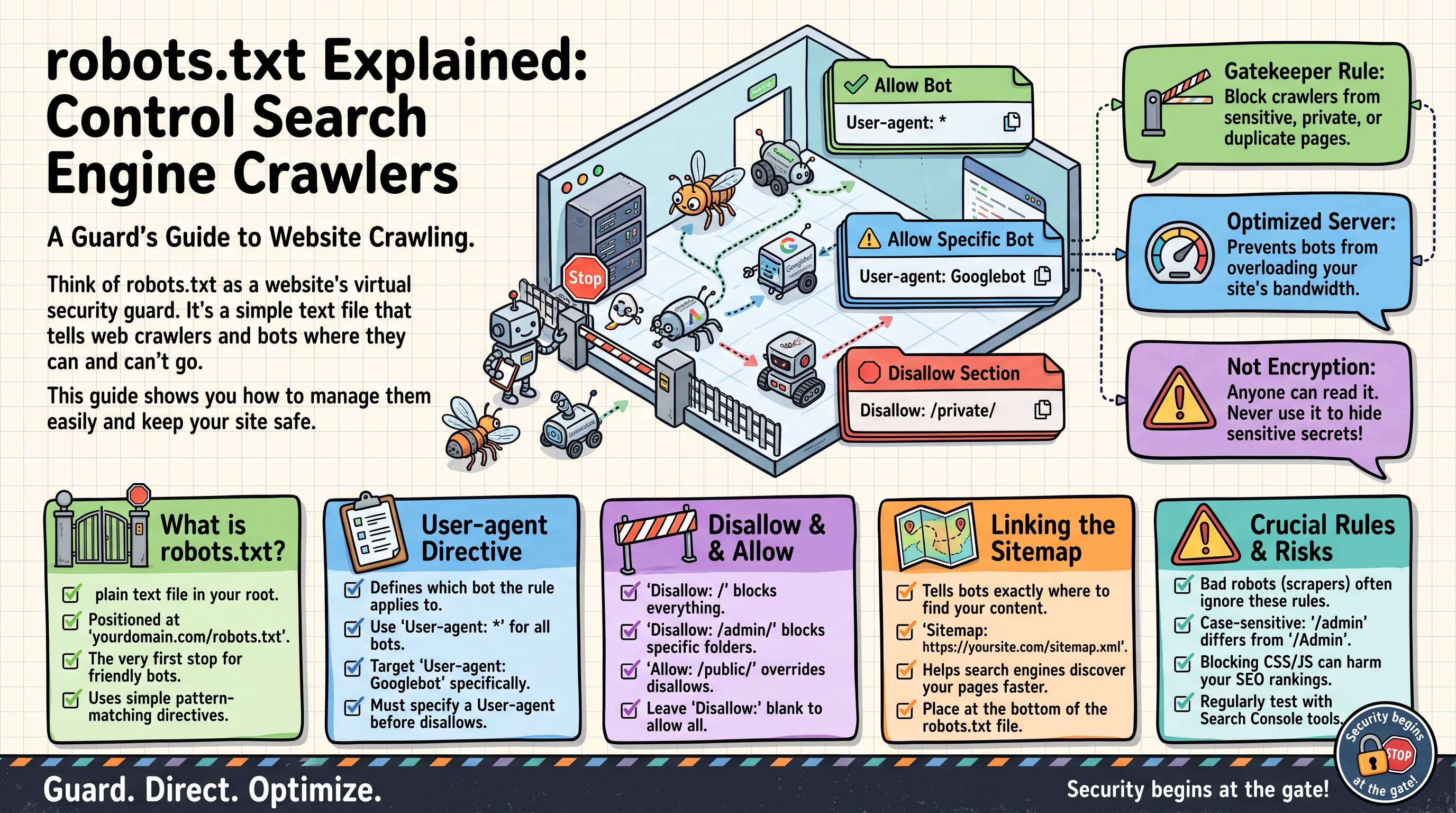
robots.txt Explained: Control Search Engine Crawlers
Every day, automated programs called crawlers (or bots, or spiders) roam the web, visiting pages and recording what they find. Google's crawler builds Google's search index this way; other crawlers archive pages, check prices, or — less nobly — scrape content and hunt for vulnerabilities.
As a website owner, you get a say in which parts of your site these well-behaved crawlers may visit. That say comes in the form of a small text file named robots.txt. This guide explains what it is, how to write one, and — just as important — what it cannot do.
What Is robots.txt?
robots.txt is a plain text file that lives at the root of your website — always at an address like:
https://example.com/robots.txt
It is one of the first things a crawler fetches when it visits your site. The file contains simple rules telling crawlers which pages or sections they are allowed to visit and which they should skip. Here is a complete, typical example:
User-agent: *
Disallow: /admin/
Disallow: /cart/
Allow: /

Sitemap: https://example.com/sitemap.xml
In plain English: "Every crawler (*): stay out of /admin/ and /cart/, everything else is fine. Oh, and here is my sitemap."
A few essential facts:
- The file must be named exactly
robots.txt(lowercase) and placed at the domain root.https://example.com/pages/robots.txtwill be ignored. - It must be a plain text file encoded in UTF-8, served with an HTTP 200 status.
- It is public. Anyone can open
yoursite.com/robots.txtin a browser — never put secrets in it (more on this below).
How Crawlers Use It
The process works like this:
- A crawler arrives at your site and requests
/robots.txtfirst. - It reads the rules and finds the group that applies to it (more on grouping below).
- It crawls only the URLs the rules permit, skipping the disallowed ones.
- It caches the file (typically for up to 24 hours), so changes are not instant.
This system is entirely voluntary — it is a convention, not a law. Reputable crawlers (Google, Bing, DuckDuckGo) honor it. Malicious bots simply ignore it.
The Syntax, Rule by Rule
A robots.txt file is made of groups. Each group starts with one or more User-agent lines (saying who the rules are for), followed by the rules themselves.
User-agent: Who the Rules Apply To
User-agent: *
The * is a wildcard meaning "all crawlers." You can also target a specific crawler by its name (called its user-agent string):
User-agent: Googlebot
Common crawler names you might see:
Crawler          Owner         User-agent name
-------          -----         ---------------
Google           Google        Googlebot
Google Images    Google        Googlebot-Image
Bing             Microsoft     Bingbot
DuckDuckGo       DuckDuckGo    DuckDuckBot
Yandex           Yandex        YandexBot
A crawler uses the group with the most specific user-agent match. If a file has both a Googlebot group and a group, Googlebot follows only its own group; every other crawler follows the group.
Disallow: What to Skip
Disallow: /admin/
This tells matching crawlers not to visit any URL starting with /admin/. Path matching is "starts with":
Disallow: /admin/ blocks /admin/, /admin/dashboard, /admin/users/edit — everything under it.Disallow: /admin (no trailing slash) also blocks /administrator and /admin-panel, because they start with/admin. The trailing slash matters!Disallow: / blocks the entire site — every URL starts with /.Disallow: (empty value) means "disallow nothing" — i.e., allow everything.
Allow: Exceptions to Disallow
Allow carves out exceptions inside disallowed areas:
User-agent: *
Disallow: /downloads/
Allow: /downloads/free-guide.pdf
This blocks the whole /downloads/ section except the one free guide. When rules conflict, the longest (most specific) match wins, so /downloads/free-guide.pdf (Allow) beats /downloads/ (Disallow) for that URL.
Sitemap: Pointing to Your Sitemap
Sitemap: https://example.com/sitemap.xml
This line tells crawlers where your XML sitemap is. It is not a rule but a hint, and it can appear anywhere in the file (convention puts it at the end). Unlike the rules, it needs the full URL including https://.
Comments
Lines starting with # are comments — ignored by crawlers, useful for humans:
# Blocked on 2026-03-14: staging area kept getting indexed
User-agent: *
Disallow: /staging/
Common Real-World Examples
1. Allow everything (the default for most sites)
User-agent: *
Disallow:
An empty Disallow means nothing is blocked. (If you have no robots.txt at all, crawlers assume this anyway.)
2. Block the admin and account areas
User-agent: *
Disallow: /admin/
Disallow: /login/
Disallow: /account/
Disallow: /checkout/

Sitemap: https://example.com/sitemap.xml
This is the most common real-world pattern: keep crawlers out of backend, login, and checkout pages that have no business in search results.
3. Block the entire site (staging / under construction)
User-agent: *
Disallow: /
Use this on development or staging servers so Google never indexes your half-built site. Danger: forgetting to remove this when the site goes live is one of the classic SEO disasters — your real site becomes invisible to search engines.
4. Block one misbehaving crawler, allow everyone else
User-agent: BadBot
Disallow: /

User-agent: *
Disallow:
The named crawler is blocked from everything; all others may roam freely. (Only works on bots polite enough to identify themselves honestly.)
5. Keep images out of Google Images
User-agent: Googlebot-Image
Disallow: /
Blocks Google's image crawler specifically, while the regular Googlebot still indexes your pages.
6. Block a file type everywhere
User-agent: *
Disallow: /*.pdf$
The $ marks the end of the URL, so this blocks any URL ending in .pdf — handy if you do not want your PDF documents in search results.
What robots.txt CAN Do
Save crawl budget. Large sites get a limited number of crawler visits; blocking junk pages (filters, internal search results, duplicate sort URLs) focuses the crawler on pages that matter.Keep utility pages out of the crawl. Admin panels, carts, login pages — no reason for a crawler to waste time there.Point crawlers to your sitemap. The Sitemap: line is a convenience every major crawler reads.Manage server load. Blocking aggressive crawlers from heavy sections (like on-the-fly PDF generation) protects your server.
What robots.txt CANNOT Do
This is where most misunderstandings live:
It is not security.robots.txt is publicly readable. Writing Disallow: /secret-admin-panel/ literally advertises that the path exists. Real protection means passwords, authentication, and server configuration — never a robots.txt rule.It does not remove pages from Google's index. Blocking a page stops Google from visiting it, but if other sites link to it, Google may still list the URL (without a description). To remove a page from search results, use a noindex meta tag or HTTP header, or require a login.It does not stop malicious bots. Scrapers, vulnerability scanners, and spam bots ignore robots.txt entirely. Block those at the firewall or with a bot-management service.It does not control how often you are crawled (mostly). Google deprecated the Crawl-delay directive; crawl rate is now managed in Search Console.
Think of robots.txt as a "please keep off the grass" sign: respected by polite visitors, useless against trespassers.
Testing Your robots.txt
Before relying on it, verify it works:
Open it in a browser. Visit yoursite.com/robots.txt and confirm the content is what you expect (and that it returns HTTP 200, not a 404 or a redirect to the homepage).Use Google Search Console. The robots.txt tester (under Settings) shows you exactly how Googlebot interprets your file and lets you test any URL against it.Check after every deploy. Staging files (Disallow: /) accidentally pushed to production are depressingly common. Make "check robots.txt" part of your launch checklist.Watch for syntax slips. A missing /, a typo in User-agent, or rules placed before any User-agent line can silently change the meaning. Keep the file short and simple.
Frequently Asked Questions
Do I need a robots.txt file? Not strictly — without one, crawlers assume everything is allowed. But nearly every real site benefits: blocking admin/login/cart pages and declaring your sitemap takes two minutes and is considered basic good practice.
How long does it take for changes to work? Crawlers cache robots.txt, typically for up to 24 hours. Google usually picks up changes within a day. It is not instant, so do not expect a fix to take effect the same minute.
Can I block just one page? Yes: Disallow: /that-page/ blocks exactly that path (and anything under it). For a single page with nothing beneath it, that is precise enough.
Why is a blocked page still showing in Google? Because blocking only stops crawling, not indexing. If Google knew the URL from links, it can list it without ever visiting. Add <meta name="robots" content="noindex"> to the page itself (and allow crawling of it, so Google sees the tag) to get it removed.
What happens if robots.txt has a syntax error? Crawlers are lenient: they ignore lines they do not understand and do their best with the rest. But a misplaced Disallow: / can block your whole site, so keep the file simple and test it.
Should I list my sitemap in robots.txt AND submit it in Search Console? Yes, do both. The Sitemap: line helps any crawler that reads the file; submitting in Search Console gives you indexing reports and error diagnostics that the file alone cannot provide.
Report content on this page
Related Articles
- XML Sitemaps Explained: Help Google Find Your Pages
- Robots Meta Tags Explained: Control How Google Crawls
- Canonical Tags Explained: Fix Duplicate Content