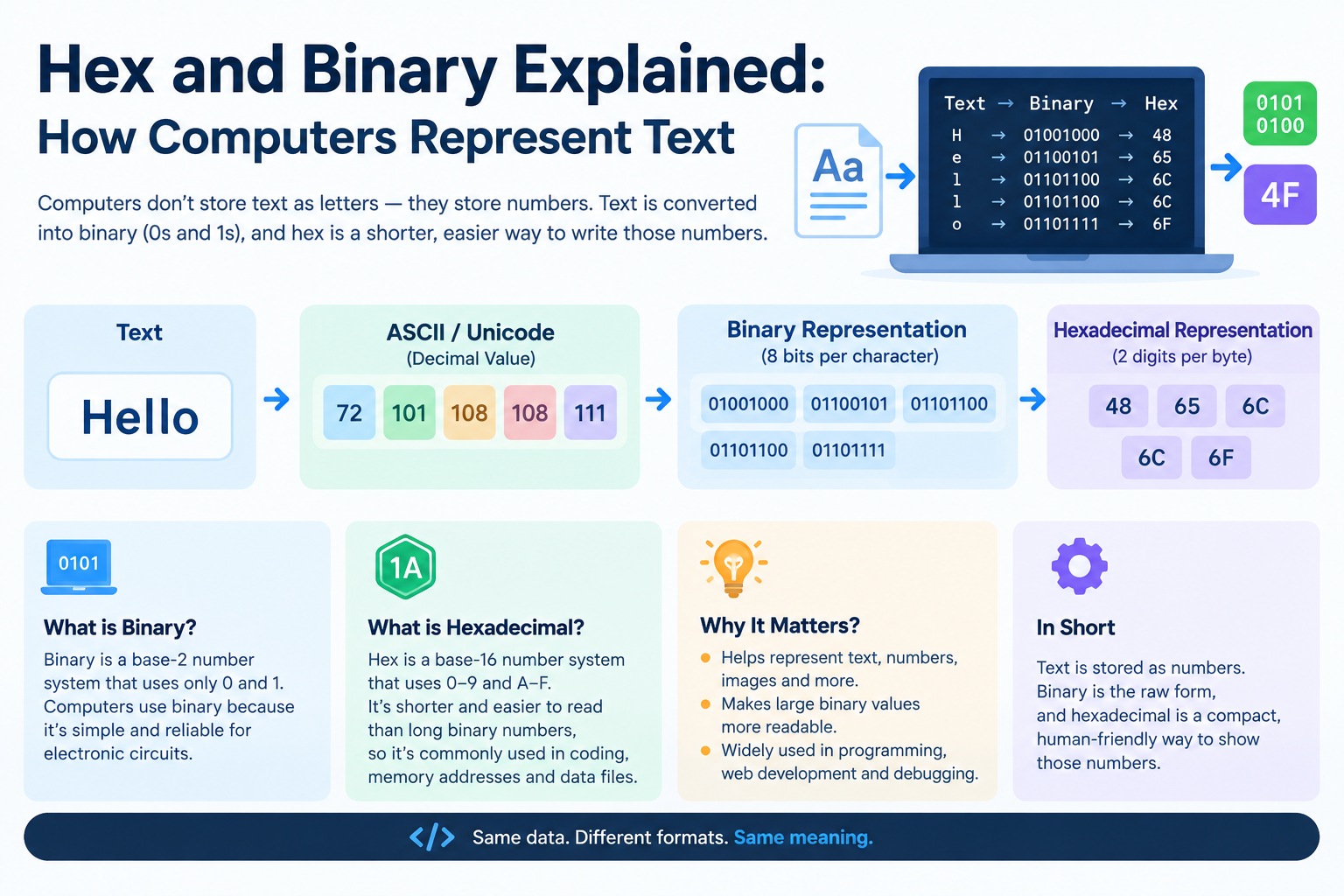
Hex and Binary Explained: How Computers Represent Text
Open a color picker and you'll see #FF5733. Open a developer tool and you'll see bytes like 48 65 6C 6C 6F. Look at a network packet and it's all ones and zeros. Hexadecimal and binary are just different ways of writing the same thing: the numbers your computer actually stores. Once you understand the relationship between them, a lot of "developer magic" becomes plain arithmetic. Let's demystify it.
Bits and Bytes: The Foundation
A bit is the smallest unit of computer storage — a single 0 or 1. Everything a computer stores, from your photos to this article, is ultimately bits.
A byte is 8 bits grouped together. Eight bits give 2^8 = 256 possible values (0 through 255). That range turns out to be extremely useful: it's enough to represent all the basic Latin letters, digits, punctuation, and control characters — which is why the byte became the standard unit.
Think of it like this: one bit is a single light switch (on or off). A byte is a row of 8 switches, and each unique pattern of on/off switches represents one number — and, by convention, one character.
Binary: Counting With Two Digits
Binary is base-2: each position represents a power of 2. Reading right to left, the positions are worth 1, 2, 4, 8, 16, 32, 64, 128.
To convert binary 01000001 to decimal:
- Positions with a
1: 64 + 1 = 65 - So
01000001= 65 in decimal.
To convert decimal 72 to binary, subtract the largest powers of 2 that fit: 72 = 64 + 8, so the 64-bit and 8-bit are on: 01001000.
Binary is exact and unambiguous, but it's verbose — a single byte needs 8 digits. That's why developers rarely read raw binary for long. They use hexadecimal instead.
ASCII: How Bytes Become Text
If a byte is just a number from 0 to 255, how does it become the letter "A"? By agreement. ASCII (American Standard Code for Information Interchange) is a table that assigns characters to the numbers 0–127:
Decimal | Hex | Binary   | Character
--------|-----|----------|--------------
65      | 41  | 01000001 | A
66      | 42  | 01000010 | B
97      | 61  | 01100001 | a
98      | 62  | 01100010 | b
48      | 30  | 00110000 | 0 (digit zero)
49      | 31  | 00110001 | 1
32      | 20  | 00100000 | (space)
33      | 21  | 00100001 | !
Notice the patterns: uppercase letters run 65–90, lowercase 97–122, digits 48–57. The digit 0 is not the number 0 — it's ASCII code 48. This trips up beginners constantly: the character "5" stored in a text file is byte value 53, not 5.
Modern text mostly uses UTF-8, which is backward-compatible with ASCII for the first 128 characters and extends it to cover every writing system on Earth. For basic English text, ASCII and UTF-8 are identical.
Hexadecimal: Binary's Compact Cousin
Hexadecimal (hex) is base-16: digits 0–9 plus A–F for values 10–15. Its superpower is a clean relationship with binary: one hex digit = exactly 4 bits (a "nibble"). So one byte = exactly 2 hex digits.
Converting between binary and hex is mechanical:
- Split the binary into groups of 4:
0100 0001 0100= 4,0001= 1 → hex41
Compare that with converting binary to decimal, which needs real arithmetic. Hex is simply binary made readable — that's the entire reason developers use it.
Common hex notation: programmers write 0x41 (the 0x prefix means "this is hex"), #41 in some contexts, or just 41 in a hex dump where everything is hex by convention.
Worked Example: Text to Binary and Hex
Let's convert the word "Hi" step by step.
Step 1: Look up each character in ASCII.
- H = 72
- i = 105
Step 2: Convert each decimal to binary.
- 72 = 64 + 8 →
01001000 - 105 = 64 + 32 + 8 + 1 →
01101001
Step 3: Convert each binary byte to hex (4 bits at a time).
0100 1000→ 4, 8 →480110 1001→ 6, 9 →69
Result: "Hi" = binary 01001000 01101001 = hex 48 69 = decimal 72 105. All four are the same data, written differently.
Going back (hex to text): take hex 48 65 6C 6C 6F. Split into bytes: 48, 65, 6C, 6C, 6F. Convert each to decimal: 72, 101, 108, 108, 111. Look up ASCII: H, e, l, l, o. The hex spells "Hello".
Where You'll Actually Meet Hex and Binary
Color codes
Web colors are hex triplets: #FF5733 means red=FF (255), green=57 (87), blue=33 (51). Each pair of hex digits is one byte — one color channel. #000000 is black (all channels off), #FFFFFF is white (all maxed). Once you see it, you can read colors: high first digit pairs mean bright, balanced values mean gray.
Debugging and data inspection
When a file won't open or data looks corrupt, developers open it in a hex editor — a tool showing the raw bytes in hex alongside the ASCII interpretation. File formats announce themselves this way: a PNG file always starts with bytes 89 50 4E 47, a PDF with 25 50 44 46 (which is ASCII for "%PDF"). These "magic numbers" let software identify files regardless of their extension.
Memory addresses and error codes
Memory addresses, crash dumps, and many error codes are shown in hex because addresses are fundamentally binary numbers, and hex keeps them compact. 0x7FFF5FBFF8A0 is much easier to scan than its 48-bit binary equivalent.
Checksums and hashes
MD5, SHA-256, and other hash values are displayed as hex strings — a SHA-256 hash is 64 hex characters representing 32 bytes. Comparing two hex strings is how you verify a download wasn't corrupted.
Networking and hardware
MAC addresses (AA:BB:CC:DD:EE:FF), IPv6 addresses (2001:0db8::1), and microcontroller registers are all conventionally written in hex.
Quick Conversion Cheat Sheet
- Binary → hex: group bits in fours from the right, convert each group (0000=0 … 1111=F).
- Hex → binary: expand each hex digit to 4 bits (A=1010, F=1111).
- Hex → decimal: multiply each digit by its place value (16, 256, 4096…) — or just use a calculator.
- Text → hex: get each character's code, write it as 2 hex digits. ("A" → 65 →
41.) - Hex → text: split into byte pairs, convert each to decimal, look up the character.
For one-off conversions, an online hex/binary/text converter — like the free ones on Converters Online — does all of this instantly and is great for checking your manual work while learning.
Mistakes Beginners Make
- Confusing the digit "0" with the value 0. In text, "0" is byte 48. The number zero as a byte is
00000000, which in text is the invisible null character. - Forgetting leading zeros. The byte for "A" is
01000001, not1000001— dropping the leading zero changes the grouping and breaks hex conversion. - Mixing up nibbles and bytes. One hex digit is half a byte (4 bits). A full byte needs two hex digits —
4alone isn't a byte,04is. - Assuming hex is encryption. Hex is just a notation. Anyone can convert it back. It hides nothing.
Frequently Asked Questions
Q: Why do programmers use hexadecimal instead of just binary or decimal? A: Hex is the sweet spot: it's compact like decimal but converts to and from binary trivially (4 bits per digit), which decimal can't do. It lets developers read raw byte-level data without drowning in ones and zeros.
Q: What's the difference between ASCII and UTF-8? A: ASCII covers 128 characters (English letters, digits, basic punctuation). UTF-8 is a superset that covers every character in every language, while keeping ASCII text byte-for-byte identical. For plain English text, they're the same thing.
Q: How can I tell what a hex string says? A: Split it into pairs (each pair is one byte), convert each pair from hex to decimal, then look up each number in an ASCII table. Or paste it into a hex-to-text converter to do it instantly.
Q: Why are colors written in hex? A: A color is three bytes (red, green, blue, 0–255 each). Hex writes each byte as exactly two digits, so #FF5733 compactly encodes all three channels. It's precise and unambiguous across every browser and design tool.
Q: Is binary the "language" computers think in? A: Sort of — at the hardware level, everything is electrical signals interpreted as 0s and 1s. But nobody programs in raw binary; we use layers of abstraction (programming languages, text encodings like UTF-8) that eventually compile down to it. Binary and hex are how we inspect what's underneath.
Related Articles
- Base64 Encoding Explained: What It Is and When to Use It
- Binary Numbers Explained: How Computers Count
- Number Bases Explained: Binary, Octal, Decimal, Hexadecimal
- ASCII vs Unicode: Text Encoding Compared
Try Our Free Tools