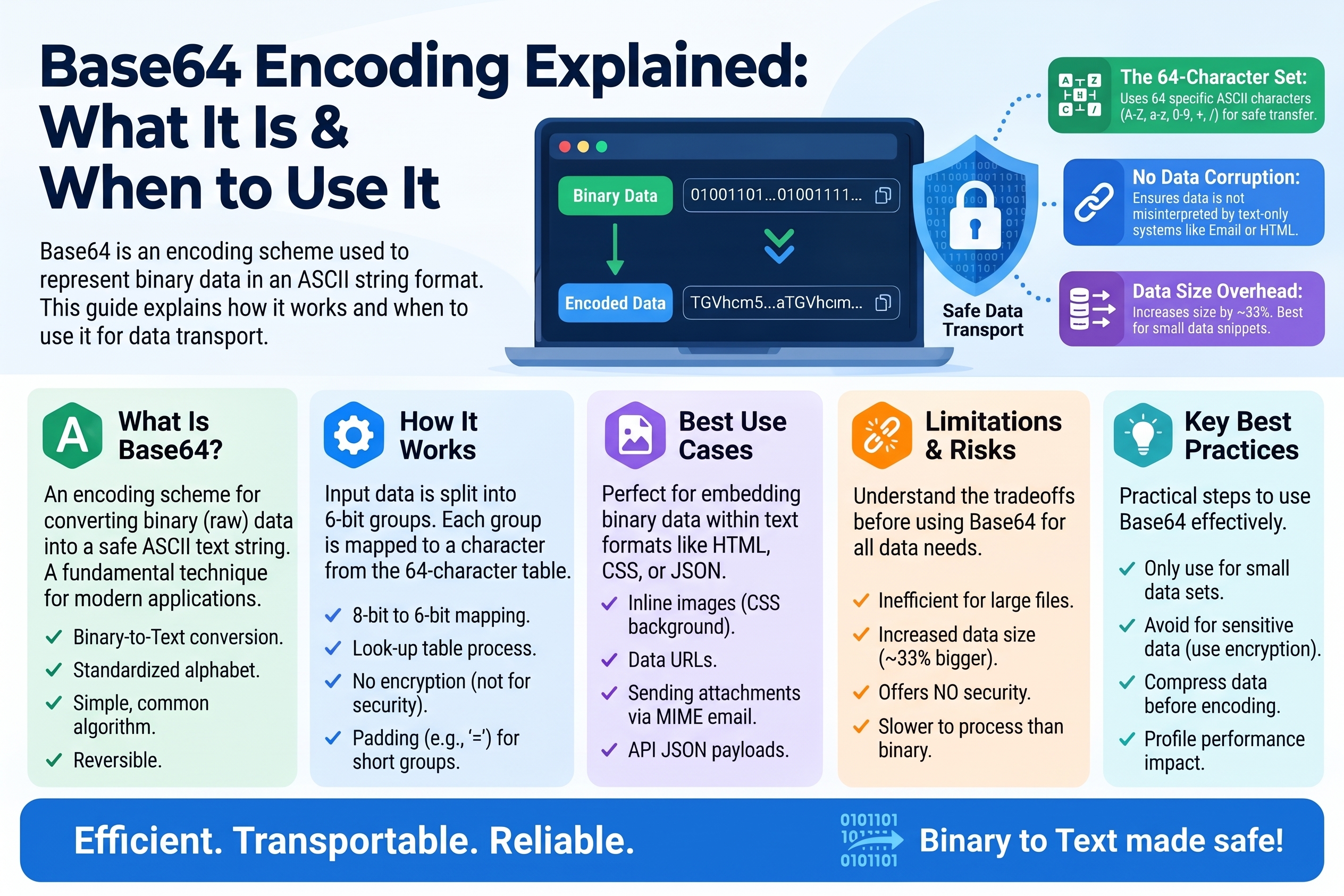
Base64 Encoding Explained: What It Is and When to Use It
You'll find Base64 everywhere once you know to look for it: embedded in email attachments, tucked inside data URIs in CSS files, carrying API tokens, and padding out JSON payloads. It looks like random gibberish — SGVsbG8gV29ybGQh — but it's one of the most practical encodings in computing. Here's what it is, how it works, and when to reach for it.
What Is Base64 and Why Does It Exist?
Computers handle binary data (images, executables, arbitrary bytes) effortlessly — but many of the systems we use to move data around were designed for plain text. Email protocols, early web standards, JSON, URLs, and configuration files all expect readable characters, and raw binary bytes can corrupt or break them: null bytes terminate strings, control characters confuse parsers, and non-ASCII bytes get mangled by text-based transports.
Base64 solves this by converting arbitrary binary data into a safe alphabet of 64 plain-text characters: uppercase A–Z, lowercase a–z, digits 0–9, plus + and /, with = used for padding. The output is pure ASCII text that survives email, JSON, URLs (with a small variant), and copy-paste without damage.
The trade-off: Base64 output is about 33% larger than the input. Every 3 bytes of data become 4 characters of text. That's the price of text-safety, and it's usually worth paying.
How Base64 Works: A Small Worked Example
The mechanics are elegant. Take the input bytes, read them as a continuous stream of bits, regroup those bits into chunks of 6, and map each 6-bit chunk to one of the 64 characters.
Why 6 bits? Because 2⁶ = 64 — exactly the size of our alphabet. Three bytes (24 bits) divide neatly into four 6-bit groups, which is where the 3-bytes-to-4-characters ratio comes from.
Let's encode the text "Hi" by hand:
Step 1: Get the bytes. In ASCII/UTF-8, H = 72, i = 105.
Step 2: Write them in binary.
- 72 =
01001000 - 105 =
01101001 - Stream:
01001000 01101001
Step 3: Regroup into 6-bit chunks.
0100100001101001— wait, we only have 16 bits, which isn't divisible by 6. Pad the stream with zeros to reach a multiple of 6:010010 000110 100100(18 bits).
Step 4: Convert each 6-bit group to decimal, then look up the Base64 alphabet.
010010= 18 →S000110= 6 →G100100= 36 →k
Step 5: Pad to a multiple of 4 characters. We produced 3 characters from 2 input bytes; add one = to reach 4.
Result: SGk=
Let's verify the alphabet positions: A=0, B=1, …, Z=25, a=26, …, z=51, 0=52, …, 9=61, +=62, /=63. S is the 19th letter → index 18 ✓. G → index 6 ✓. k is the 11th lowercase letter → 26+10 = 36 ✓.
Decoding reverses the process: map each character back to its 6-bit value, concatenate the bits, regroup into bytes, and drop the padding. SGk= → 010010 000110 100100 → regroup into 8-bit bytes 01001000 01101001 (dropping the 2 pad bits) → 72, 105 → "Hi".
The = padding isn't data — it just signals how many bytes the final group contained, so the decoder knows where the real bits end.
Common Uses of Base64
Data URIs: embedding images in HTML/CSS
Instead of linking to an image file, you can embed small images directly:
<img src="data:image/png;base64,iVBORw0KGgoAAAANSUhEUg...">
This eliminates an HTTP request, which is great for tiny icons and one-off graphics. The rule of thumb: data URIs win for images under a few kilobytes; beyond that, the 33% size overhead and loss of caching make separate files better.
Email attachments (MIME)
Email was built for 7-bit ASCII text. When you attach a photo, your email client Base64-encodes it into the message body under a Content-Transfer-Encoding: base64 header. The recipient's client decodes it back into the original file. This invisible machinery runs every time anyone emails an attachment.
API tokens and credentials
Many API keys and tokens are random bytes encoded as Base64 (or its URL-safe cousin) — it's compact, copy-paste friendly, and avoids characters that break headers or JSON. HTTP Basic Authentication literally sends Base64(username:password) in the Authorization header.
Embedding binary data in JSON/XML
JSON has no binary type — it's text all the way down. To send a file, a cryptographic signature, or a serialized object inside JSON, developers Base64-encode it into a string field. Configuration files and JWT tokens use the same trick.
Quick data obfuscation (not security!)
Some developers Base64-encode values to keep casual eyes off them — hiding an internal ID in a URL, for example. This stops nobody determined (more on this below), but it does prevent accidental misreading and keeps binary out of text contexts.
Base64 vs. Encryption: It Is NOT Encryption
This is the most important section of this article. Base64 provides zero confidentiality. It is an encoding — a reversible change of representation, like writing the same sentence in Morse code. Anyone who recognizes Base64 can decode it instantly, with no key, no password, no effort. There are decoders built into every browser console (atob() in JavaScript), every Python install (base64 module), and countless free online tools.
Encoding is not encryption:
                           | Encoding (Base64)     | Encryption (AES, etc.)
---------------------------|-----------------------|------------------------
Purpose                    | Change representation | Hide information
Reversible by              | Anyone, trivially     | Only key holders
Needs a key                | No                    | Yes
Protects against attackers | No                    | Yes
Real-world consequences of confusing the two: "encrypted" passwords stored as Base64 in a database (decodable by anyone who reads the DB), "secure" tokens in URLs that are just Base64 of a user ID (anyone can decode and forge them), API "secrets" that are merely encoded config values. If data needs to be secret, encrypt it with a real algorithm and manage keys properly. If data just needs to survive a text-based transport, Base64 is the right tool.
Step-by-Step: Encode and Decode
Encoding "Hello World!" by hand (conceptual)
You already saw the full manual process with "Hi" above. For longer text, the steps are identical — group bytes in threes, convert to four characters each. In practice, nobody does this by hand; here's how it's done for real:
In Python:
import base64
encoded = base64.b64encode(b"Hello World!")   # b'SGVsbG8gV29ybGQh'
decoded = base64.b64decode(encoded)            # b'Hello World!'
In JavaScript (browser):
const encoded = btoa("Hello World!");   // "SGVsbG8gV29ybGQh"
const decoded = atob(encoded);          // "Hello World!"
(Note: btoa/atob handle Latin-1; for full Unicode text, encode to UTF-8 bytes first.)
With an online tool: paste your text (or file) into a free Base64 encoder — like the one on Converters Online — click encode, and copy the result. For decoding, paste the Base64 string and get the original back. Online tools are ideal for one-off conversions, debugging data URIs, or inspecting a token you received.
Worked decode: what does Q29udmVyc29ucyBPbmxpbmU= say?
Map each character to its 6-bit value, concatenate, regroup into bytes:
- The string decodes to bytes: 43 6F 6E 76 65 72 73 6F 6E 73 20 4F 6E 6C 69 6E 65
- In ASCII:
Converters Online
(Try it in a decoder to verify — building the habit of checking your work is half the skill.)
Base64 Variants Worth Knowing
- Standard Base64: alphabet includes
+and/, padding with=. Used in MIME/email. - URL-safe Base64: replaces
+with-and/with_, often omits padding. Used in JWTs and anywhere the output appears in URLs or filenames, since+and/have special meaning there. - Base64 in data URIs uses the standard alphabet.
If your Base64 string will ever appear in a URL, use the URL-safe variant — otherwise a + may silently become a space and corrupt your data.
Practical Tips
- Don't Base64 large files casually. The 33% overhead on a 100 MB video is 33 MB of pure waste. Encode only what needs to be text.
- Watch out for line breaks. MIME Base64 wraps lines at 76 characters; some decoders choke on unexpected newlines. Most modern tools handle both.
- Validate before decoding. A single invalid character means corrupted data. Good decoders report errors instead of silently producing garbage — pay attention to them.
- Remember it's not compression. Base64 makes data bigger. If you need smaller, compress first (e.g., gzip), then encode — the order matters.
Frequently Asked Questions
Q: Is Base64 encryption? A: No. Base64 is an encoding — anyone can decode it instantly with no key. It provides zero confidentiality. Never use it to "protect" passwords, personal data, or secrets. Use real encryption (like AES) when secrecy matters.
Q: Why does Base64 output end with = signs? A: The = is padding. Base64 works in 3-byte groups; if the input length isn't a multiple of 3, padding fills the output to a multiple of 4 characters so the decoder knows exactly where the data ends. One = means the last group had 2 bytes; two == means it had 1 byte.
Q: Why is Base64 output bigger than the input? A: Each 6-bit chunk becomes a full 8-bit character, so 3 bytes (24 bits) become 4 characters (32 bits) — a 33% increase. It's the cost of representing binary data with a text-safe alphabet.
Q: What's the difference between Base64 and URL-safe Base64? A: URL-safe Base64 swaps + → - and / → _ (and usually drops padding) so the output can appear in URLs and filenames without conflicting with characters that have special meaning there. JWT tokens use this variant.
Q: When should I use a data URI instead of linking an image file? A: For very small images (icons, tiny graphics under a few KB), data URIs save an HTTP request. For larger images, link the file normally — the 33% Base64 overhead, larger HTML/CSS files, and loss of browser caching make data URIs counterproductive.
Related Articles
- Hex and Binary Explained: How Computers Represent Text
- ASCII vs Unicode: Text Encoding Compared
- Number Bases Explained: Binary, Octal, Decimal, Hexadecimal
Try Our Free Tools