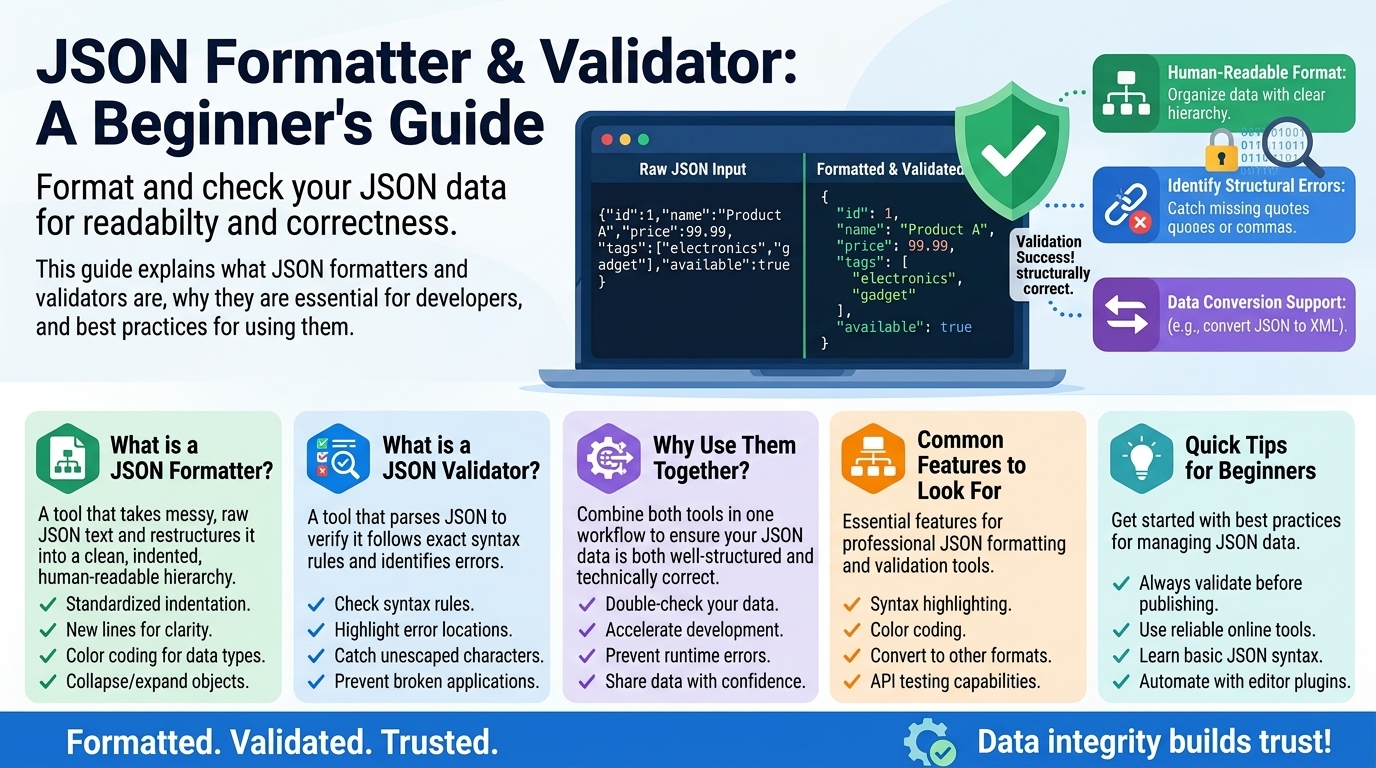
JSON Formatter & Validator: A Beginner's Guide
If you have ever copied a configuration file, worked with a web API, or pasted an error message into a forum, you have already met JSON — even if you did not know its name. JSON (pronounced "Jason") is the plain-text format behind a huge share of the data moving around the internet: API responses, app settings, and countless configuration files.
JSON looks simple — until one tiny mistake makes the whole thing fall apart. A single misplaced comma or a pair of wrong quotes can turn a good data file into something no program can read. That is where JSON formatters and validators come in. In this guide, you will learn what JSON actually is, why formatting and validating it matters, the most common syntax errors, and how to fix broken JSON step by step.
What Is JSON, Exactly?
JSON stands for JavaScript Object Notation. Despite the name, it is not only for JavaScript — nearly every programming language can read and write it, which is exactly why it became the universal language of data exchange on the web.
At its core, JSON stores data as key-value pairs (like a labeled filing cabinet) and ordered lists (arrays). Here is the same data in two forms — first "pretty-printed" for humans, then "minified" for machines:
{
  "name": "Ayesha Khan",
  "age": 29,
  "isStudent": false,
  "courses": ["Math", "Physics", "Chemistry"],
  "address": {
    "city": "Lahore",
    "zip": "54000"
  }
}
{"name":"Ayesha Khan","age":29,"isStudent":false,"courses":["Math","Physics","Chemistry"],"address":{"city":"Lahore","zip":"54000"}}
Both versions carry exactly the same information. The first is easy for a human to scan; the second is smaller and faster to transmit, so servers usually send that one. A JSON formatter converts between the two: it takes the cramped minified version and expands it into the readable one (this is called "pretty-printing"), or squashes the readable version down for transmission.
JSON supports only a small set of value types: strings, numbers, booleans (true/false), null ("no value"), objects (the {...} key-value containers), and arrays (the [...] ordered lists). That small set is a feature — it is what makes JSON predictable for every language to parse.
Why Formatting Matters
Imagine receiving the minified blob above as a 5,000-character API response and being told "there is a typo in the customer's address somewhere." Pretty-printing it with a formatter turns that wall of text into an indented outline where every key sits on its own line. Problems become visible in seconds instead of minutes.
Formatting also reveals structure. Nested objects and arrays can run several levels deep; proper indentation shows at a glance which keys belong to which object. And formatted JSON is what you want in documentation, bug reports, and forum posts — pasting the readable version dramatically increases the odds that someone actually reads it and spots your problem.
Why Validating Matters
JSON has strict grammar rules, and parsers are unforgiving: one syntax error anywhere invalidates the entire document. There is no "mostly valid" JSON. If your app's settings file has a single trailing comma, the app may refuse to start with a cryptic error like Unexpected token } in JSON at position 214.
A JSON validator checks your text against the rules and tells you precisely what is wrong and where — usually with a line number and a description like "trailing comma." Without a validator, you are hunting blind; with one, fixing errors becomes quick and mechanical. It matters most when editing config files by hand, when debugging API requests (validating what you sent and received tells you whether the data or your code is at fault), and when copying examples from tutorials (which often contain typos or comments that are not legal JSON).
The 7 Rules of Valid JSON
You do not need to memorize a specification — these seven rules cover virtually everything:
1. Keys AND string values use DOUBLE quotes:  "name"  (never 'name')
2. NO trailing commas — the last item in an object or array gets no comma
3. NO comments — neither // nor /* */ is allowed
4. Numbers: no leading zeros (write 7, not 007); no "NaN" or "Infinity"
5. Allowed values only: string, number, object, array, true, false, null
6. The whole document must be one object { } or one array [ ]
7. Every opening bracket/brace must have a matching closing one
Rule 1 is the one that trips up the most beginners, because JavaScript itself happily accepts single quotes. JSON does not — it is stricter than JavaScript. Rule 2 bites anyone who adds a new item to the end of a list and leaves the old trailing comma behind.
Common JSON Syntax Errors (and How to Spot Them)
Here are the five mistakes beginners make most often, each with the broken version, the error a validator would report, and the fix.
1. Trailing comma. The most common JSON error in existence. You add an item to the end of a list and forget to remove the comma from the previous last item.
{
  "name": "Ayesha Khan",
  "age": 29,
}
Validator says: Unexpected token } — it found a comma promising another item, then hit the closing brace instead. Fix: delete the comma after 29.
2. Single quotes instead of double quotes. Very common for people coming from JavaScript or Python.
{
  'name': 'Ayesha Khan'
}
Validator says: Unexpected token ' — JSON strings must use double quotes, always. Fix: replace every ' with ".
3. Unquoted keys. Also borrowed from JavaScript habits.
{
  name: "Ayesha Khan"
}
Validator says: Unexpected token n (or similar) — keys must be quoted strings. Fix: "name".
4. Comments in the file. Many config formats allow comments; JSON does not.
{
  // user details below
  "name": "Ayesha Khan"
}
Validator says: Unexpected token /. Fix: delete the comment entirely. (If you need notes, keep them outside the JSON.)
5. Missing comma between items. The mirror image of the trailing comma — you add a new line and forget the comma on the line above.
{
  "name": "Ayesha Khan"
  "age": 29
}
Validator says: Unexpected token " or Expected ,. Fix: add a comma after "Ayesha Khan".
Notice the pattern: almost every JSON error is about commas and quotes. When a validator points at a position, check the commas and quotes immediately before it — the real mistake is often one line above, because the parser only realizes something is wrong when it hits the next token.
Worked Walkthrough: Validate and Fix Broken JSON
Let us put it all together. Suppose you copied this settings snippet from a forum and your app refuses to load it:
{
  'appName': 'InvoiceTracker',
  'version': 2.1,
  'debug': true,
  'allowedUsers': ['ali', 'sara', 'umer',],
  // last updated by admin
  'limits': {
    'maxInvoices': 500
    'currency': 'PKR'
  }
}
Step 1 — Paste it into a JSON validator. Do not eyeball it; let the tool do the first pass. It reports the first error: Unexpected token ' at line 2.
Step 2 — Fix the quotes. The whole snippet uses single quotes. Replace them all with double quotes (a formatter tool will not do this for you — this is a manual find-and-replace, or your editor can do it).
Step 3 — Re-validate. The validator now reports: Unexpected token ] at the allowedUsers line. That is the trailing comma after 'umer',. Delete it.
Step 4 — Re-validate. Next error: Unexpected token /. That is the comment on its own line. Delete the entire comment line.
Step 5 — Re-validate. Next error: Unexpected token " at the 'currency' line. Look one line up: the 'maxInvoices': 500 line is missing its comma. Add it.
Step 6 — Re-validate. No errors. Now hit Format / Pretty-print to get the clean version:
{
  "appName": "InvoiceTracker",
  "version": 2.1,
  "debug": true,
  "allowedUsers": ["ali", "sara", "umer"],
  "limits": {
    "maxInvoices": 500,
    "currency": "PKR"
  }
}
Four errors, fixed one at a time in under two minutes. The key habit: fix one error, re-validate, repeat. Validators stop at the first problem, so another may wait behind it. Do not try to fix everything in one pass.
How to Use a JSON Formatter/Validator Tool
Using an online JSON tool takes about thirty seconds:
- Paste your JSON into the input box.
- Press Validate. If there are errors, you get the line number and a description — fix them one by one as shown above, re-validating after each fix.
- Once it validates, press Format (pretty-print) to get the readable, indented version — or Minify if you need the compact single-line version for an API call.
- Copy the result and use it wherever you need it.
One practical tip: when an API returns an error and you suspect the data, paste the response into the validator too. Half the time the "bug in your code" turns out to be malformed data from the other end, and the validator proves it in seconds.
Frequently Asked Questions
Is JSON the same as a JavaScript object? Not quite. JSON is a text format inspired by JavaScript object syntax, but stricter: double quotes required, no comments, no trailing commas, no functions. A JavaScript object lives in memory; JSON is the text you write to a file or send over a network to recreate that object later.
Why does my JSON work in JavaScript but fail validation? Because JavaScript is lenient and JSON is not. JavaScript accepts single quotes, unquoted keys, trailing commas, and comments. A JSON parser accepts none of those. If you are building JSON by hand in JS style, run it through a validator before using it anywhere else.
What is the difference between formatting and validating? Validating checks correctness — "does this follow the rules?" Formatting changes appearance — re-indenting valid JSON for humans (pretty-print) or compressing it for machines (minify). Validate first; a formatter cannot fix broken JSON.
Can JSON contain dates? JSON has no date type — dates appear as strings like "2026-10-01" or as Unix timestamps. Both are conventions your application agrees on, not something JSON itself understands.
How large can a JSON file be? There is no formal limit, but very large files (tens of megabytes) can be slow to format in a browser-based tool and painful to edit by hand. For huge datasets, developers usually process JSON programmatically instead of opening it in an editor.
Conclusion
JSON earns its popularity by being simple — but "simple" still has rules, and parsers enforce them without mercy. The good news: nearly every JSON problem is a comma, quote, or bracket problem, and a validator turns each one from a mystery into a line number. Build the habit early: paste, validate, fix one error at a time, then format. The cryptic Unexpected t— they are just instructions telling you where to look.
Related Articles
- JSON vs XML: Which Data Format Should You Use
- YAML Config Files: A Practical Guide With Examples
- REST APIs Explained for Beginners
- Regex Basics with Examples: A Beginner's Guide
Try Our Free Tools